
Hotfixes
Version 1 - Reviewed: April 16, 2010
Hotfix: Plain Text Is Truncated in a Whole Document Tariff Record Version
When entering the content for a whole document tariff record version in TariffShark (Figure 1), the plain text version of the document is pasted into a text box. Version 1.0.0.0 of TariffShark has limited the amount of text that can be pasted to 32K characters. If the plain text contains more than 32K characters, those beyond the first 32K are lost. Further, FERC's eTariff rules limit the size of the plain text to 10MB.
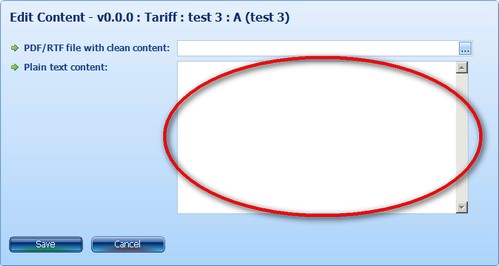
Figure 1: Whole Document Plain Text Content Textbox
This bug in the TariffShark Premier client has been fixed and is available for download.
Resolution
- Download TariffSharkPremier.exe for the version of Microft Office that you use, and save it to your desktop
- Open the folder where TariffShark 1.0.0.0 is installed
- C:\Program Files\TariffShark™ Premier 1.0
- For 64-bit Windows versions of XP/Vista, the folder usually is C:\Program Files (x86)\TariffShark™ Premier 1.0
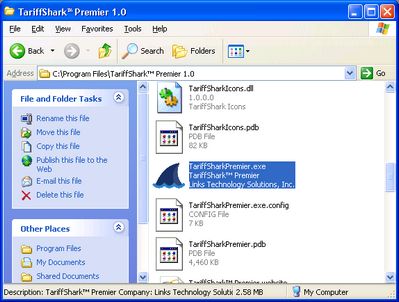
- Create a copy of TariffSharkPremier.exe for backup purposes
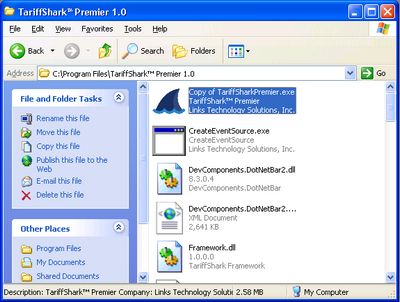
- Replace TariffSharkPremier.exe with the one saved to your desktop (confirm overwrite)
- Start TariffShark, and verify version 1.0.0.1 is displayed

More Information
APPLIES TO
- TariffShark 1.0.0.0 for Office 2003 running on Windows XP/Vista
- TariffShark 1.0.0.0 for Office 2007 running on Windows XP/Vista
Support
Contact
Business Hours
About
TariffShark is a full life-cycle e-tariff management software solution that generates FERC-defined XML in an on-premise or hosted environment.
Effective April 1, 2010, The Federal Energy Regulatory Commission (FERC) revised its regulations to require that all tariffs and tariff revisions and rate change applications for the public utilities, natural gas pipelines, oil pipelines and power administrations be filed electronically according to a set of standards developed in conjunction with the North American Energy Standards Board (NAESB).
The Commission requires that all tariffs, tariff revisions and rate change applications be filed electronically in the manner prescribed by Order No. 714. The affected required filers are:
- Public utilities and Power Marketing Administrations under Parts 35 and 300;
- Natural gas pipelines under Parts 154 and 284;
- Intrastate gas pipelines under Part 284; and
- Oil pipelines under Part 341.
Contact Us

Suite 220
Schaumburg, IL 60173
Sales: (847) 252-7286
Support: (847) 252-1611
Fax: (847) 252-7282
Email: [email protected] Schedule a Demo
Monthly Newsletter
Subscribe to our newsletter and stay up to date with the latest news and deals!
Stay Connected
2026 © Links Technology Solutions, Inc. All Rights Reserved.
